Privacy Policy
Last updated: August 13, 2026
What GuardianAlarm is
GuardianAlarm is a cooking safety reminder tool. It is not a medical device and does not provide emergency services. It is not a substitute for professional monitoring or emergency response. If you or someone you know is in immediate danger, call your local emergency services (such as 911).
Information we collect
- Account data: your email address, used to create and authenticate your account via Supabase Auth.
- Cooking session data: dish type, duration, session start/end time, check-in events, and escalation level history.
- Emergency contacts: name, phone number, and email address of people you choose to add as contacts. You are responsible for obtaining their consent before adding their information.
- Status links: when we notify a contact, we generate a single-use web link that shows that one cooking session's live status. The link expires, requires no account, and reveals nothing else about you. We record how many times it was opened.
- Routine notes: optional free-text notes about daily routine and meal preferences, visible only to you.
We do not collect location data, health records, or payment information.
How we use your information
- To operate cooking session timers and send escalation notifications to your device.
- To notify your emergency contacts via SMS and email if you do not respond to escalation levels 5 or 6. Contact information is used solely for this purpose.
- To let a notified contact follow that one session's status through the expiring link included in their alert.
- We do not sell, rent, or share your data with advertisers or third parties for marketing.
Third-party services
- Supabase — database, authentication, and real-time messaging. Data is stored on Supabase's infrastructure. See supabase.com/privacy.
- Twilio — SMS notifications to emergency contacts at escalation levels 5 and 6. See twilio.com/legal/privacy.
- Resend — email notifications to emergency contacts at escalation levels 5 and 6. See resend.com/legal/privacy-policy.
Data retention and deletion
You may delete your account at any time from within the app (Settings → Delete Account). Deleting your account permanently removes your profile, session history, status links, and emergency contact data from our systems. Residual backups may persist for up to 30 days.
Children
GuardianAlarm is not directed at children under 13. We do not knowingly collect data from children.
Contact
Questions about this policy? Email info@guardianalarm.app.
Terms of Service
Last updated: August 13, 2026
Acceptance
By creating an account or using GuardianAlarm, you agree to these terms. If you do not agree, do not use the app.
Not a safety guarantee
GuardianAlarm is a reminder and notification tool. It does not guarantee that alerts will be delivered, that your contacts will respond, or that any emergency will be prevented. Notifications depend on internet connectivity, device settings, and third-party services outside our control. Do not rely on GuardianAlarm as your sole safety measure.
Emergency contacts
You are responsible for obtaining consent from any person you add as an emergency contact before adding their information to the app. By adding a contact, you represent that you have their permission to share their contact details and to send them notifications on your behalf.
Acceptable use
You may not use GuardianAlarm to harass, spam, or send unwanted notifications to any person. You may not attempt to access other users' accounts or data. You may not reverse-engineer or abuse the service.
Limitation of liability
GuardianAlarm is provided "as is." To the fullest extent permitted by law, we are not liable for any indirect, incidental, or consequential damages arising from your use of the app, including any failure to deliver notifications or any outcome related to a cooking or safety incident.
Changes to these terms
We may update these terms from time to time. Continued use of the app after changes are posted constitutes acceptance. The "last updated" date at the top of this page reflects the most recent revision.
Contact
Questions? Email info@guardianalarm.app.
SMS Messaging & Consent
Last updated: August 13, 2026
What we send
GuardianAlarm sends SMS alerts to the emergency contacts an account holder has added. Messages are sent only when an account holder starts a cooking session or alarm and then does not check in within the time they set. There is no marketing, promotional, or recurring scheduled messaging of any kind.
How consent is obtained
Consent is collected in two steps, and no alert is ever sent to a phone number that has not completed both.
- The account holder confirms permission. Emergency contacts are added by the account holder, who must tick a required confirmation stating they have that person's permission. The form cannot be submitted without it.
- The contact confirms for themselves. Saving the contact sends that number one message asking them to reply YES. Until they reply, the contact stays in a pending state and receives nothing further. If they never reply, they never receive an alert.
The confirmation request reads:
[GuardianAlarm] {account holder} added you as an emergency contact. If they don't check in after cooking or after an alarm, we'll text you so you can check on them. Reply YES to confirm. Reply STOP to opt out, HELP for help. Msg&data rates may apply.
A contact who replies YES receives one confirmation in return, and nothing else until an account holder actually misses a check-in:
[GuardianAlarm] You're confirmed as an emergency contact. We'll only text you if someone you're listed for misses a check-in. Reply HELP for help, STOP to opt out. Msg&data rates may apply.
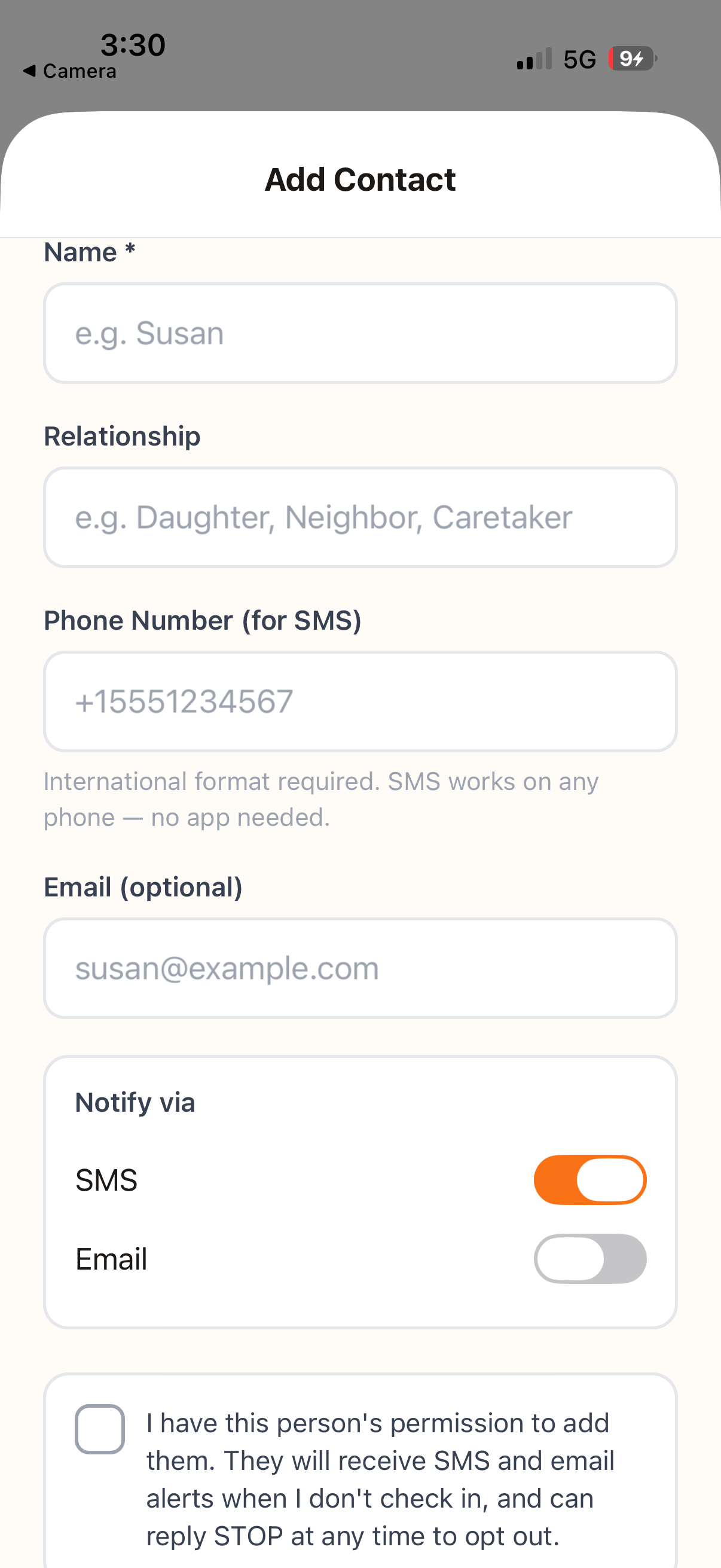
Message frequency
Message frequency varies and depends entirely on the account holder. A contact receives messages only when an account holder misses a check-in. Most contacts receive no messages at all in a typical week.
Opting out and getting help
Reply STOP to any message — including the first confirmation request — to stop receiving them. Opt-out is immediate and permanent for that phone number until you text START to opt back in. Reply HELP for help, or email the address below. Account holders can also remove a contact at any time from within the app, and can see there which of their contacts have not yet confirmed.
Rates
Message and data rates may apply. Carriers are not liable for delayed or undelivered messages.
Contact
Questions about our messaging program? Email info@guardianalarm.app.